Thursday, 13 October 2011

iTunes error 3194

Just got this error when trying to update to ios5 on iPad v2.

Check the following;
On windows PC
edit c:\Windows\system32\drivers\etc\host
and put a # in front of the following
74.208.105.171 gs.apple.com
becomes
#74.208.105.171 gs.apple.com
Save and Exit.

What worked for me was my PC was no longer authorised with iTunes;

Go into iTunes, store and Authorise this Computer.

Try updating again; hopefully this helps?

Monday, 10 October 2011

Samsung Galaxy SII and Exchange 2007/2010

My wife recently purchased the glorious Samsung Galaxy SII; setup was a breeze until I tried connecting it to Exchange. 

I kept getting the username and passwords do not match even though they were correct; being lazy I thought it was something I had misconfigured so I deleted the profile and started again; same error!

Did a quick Google hoping to find a solution and found lots of people with the same error; so I started digging a bit more (which was easy because I manage our Exchange environment!)

In order for Exchange integration to work on a mobile device it uses ActiveSync which is SSL and port 443 onto the Exchange Server.

If you login to Exchange OWA; Options you should see something like this; click phone and your devices will be shown to the right.

image

image

As you can see the Samsung SII did actually connect to the Exchange Server but something happened that prevented the device from fully connecting;

What I suspect had happened was the phone did not have a pin or complex password for the Unlock screen as by default a security policy will be sent down to the phone even if the Exchange security policy is blank; the user must then accept the policy which then gets applied and the phone is accepted for ActiveSync.

In my situation this still did not work; what did work for me was removing the device from Exchange;

Select your Phone as follows;

image

And carefully select the X (delete) icon as shown in red below; this will not wipe or do anything to your Phone; rather its removing the device from your Exchange profile.

image

Once this has been removed; power off and back on your phone and complete the email process again; hopefully all should work. You should also accept the Exchange Security Policy and after a few minutes your emails should start to Sync.

I have noticed this scenario a few times with other Android devices and I suspect its either a bug or the device is not fully supporting Microsoft’s ActiveSync (which is licensed by the phone provider).

One other last tip; the username has to be domain\username don't get confused by the label of Domain: Username.

I hope this helps.

Monday, 8 August 2011

Exchange 2003 and Mailbox Language

Scenario; your in another country and you check your email via OWA and for some reason the language within OWA and Outlook changes?

Fix, try this:

1. Open control panel, expand "Regional and language options","Regional Option", select "English" or your chosen language.

2. [HKEY_CURRENT_USER\Software\Microsoft\Internet Explorer\International] = "AcceptLanguage"="en-GB"

3. log off and log on to your machine

4. Start, Run

Outlook /resetfoldernames


Exchange 2010 and Mailbox Language

PowerShell prompt;

Set-Mailbox -Identity "Joe Blogs" -Languages "en-GB"

Language Codes

Friday, 5 August 2011

VMware vSphere 5 Licensing and Pricing Update

As Citizen Smith would say ‘Power to the People!’

VMware has decided to double (x2) the vRam entitlements under its new licensing rules.

image


Does it go far enough?

http://blogs.vmware.com/partner/2011/08/vmware-vsphere-5-licensing-and-pricing-update.html

Wednesday, 27 July 2011

Lync: July 2011 update

Lync Client 2010 (64bit)
kb 2571543
link Microsoft download

Lync Client 2010 (32bit)
kb 2571543
link Microsoft download

Lync Server 2010
kb 2493736
link Microsoft download

Lync 2010 Group Chat Server
kb 2571550
link Microsoft download

Tuesday, 19 July 2011

Exchange 2010 - Manage Full Access Permissions

You need to give another user access to a mailbox?

Use the Manage Full Access Permission wizard to grant Full Access permissions to users or groups for a selected mailbox. You can also use this wizard to remove Full Access permissions from users or groups.

When you grant the Full Access permission to another user for a mailbox, that user will be able to log on to the mailbox and access its entire contents.

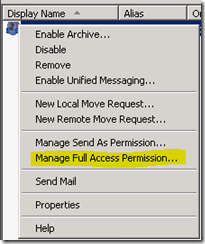
Find the mailbox in the EMC (Exchange Management Console)
image

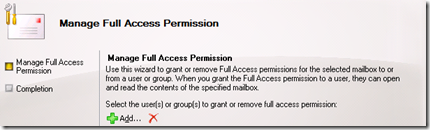
Right click the mailbox and “Manage Full Access..”
image

Click Add and Find/Select the User/Group you want to give access to.
image

Click Manage and the permissions will be applied.


PowerShell is much quicker though.

Adding Permissions

Add-MailboxPermission -Identity "mailbox_you_need_access_to" -User "user_or_group_looking_access" -AccessRights Fullaccess -InheritanceType all

Removing Permissions

Remove-MailboxPermission -Identity "mailbox_you_need_access_to" -User "user_or_group_remove_access" -AccessRight FullAccess -InheritanceType All


Adding the Mailbox into Outlook

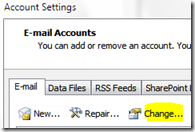
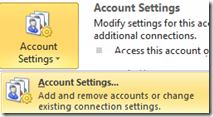
In Outlook 2007/10 Open your account Settings ..
image

Select your account and click Change

image

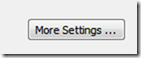
Choose the More Settings ..

image

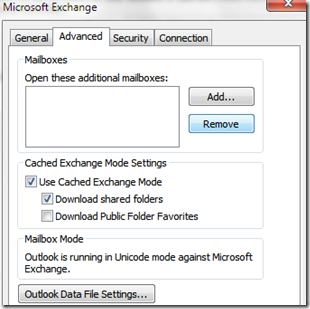
Add the email Account that you want to access.
image

Click Ok, Next and Finish.


From Outlook Web App (OWA)

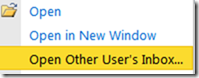
Right Click your name above the Inbox.
image

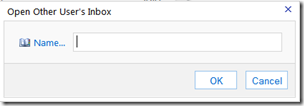
Select Open User’s Inbox ..

image

Enter the name of the mailbox you want to open; and click Ok.

OR

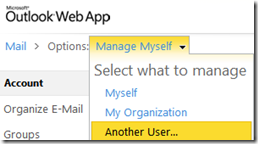
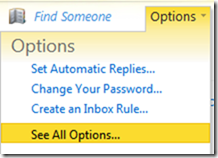
In Outlook Web App, go to Options
image

Manage, Another User

image

Find the user and Click Ok.

image

Saturday, 16 July 2011

Exchange 2010 SP1 RU4 Removed from Download Center

Microsoft have discovered an issue impacting some customers who have installed Exchange 2010 SP1 RU4 into their Exchange environment and as a result have removed SP1 RU4 from Download Center and recommend customers do not proceed with any planned deployments of SP1 RU4.

A small number of customers have reported when the Outlook client is used to move or copy a folder that subfolders and content for the moved folder are deleted.

For more information please visit.

http://blogs.technet.com/b/exchange/archive/2011/07/13/exchange-2010-sp1-ru4-removed-from-download-center.aspx