Wednesday, 30 November 2011

Lync 2010 CU4 (November 2011)

Updates are;

Download the Lync.msp x86 package.

Download the Lync.msp X64 package.

Download the LyncServerupdateInstaller.exe package.

KB; http://support.microsoft.com/?kbid=2493736

Don’t forget after your server install to run the following PowerShell script;

Install-CsDatabase -Update -ConfiguredDatabases -SqlServerFqdn < EEBE.Fqdn > -DatabasePaths <RtcDyn log path>, <RtcDyn data path>

Where <EEBE.Fqdn> is you’re frontend server when running the Standard edition and the SQL server when running in Enterprise edition.

EMC Avamar 5 and Exchange 2010 Backups

On your Exchange 2010 Server install the following clients (or later) in this order;

AvamarClient-windows-x86_64-5.0.106-28.msi
AvamarExchangeVSS-windows-x86_64-5.0.106-28.msi

Make sure that your Avamar Backup User is a member of the local Administrator account (or recommended part of the Domain Admins).

Within Avamar you should now see the following

image

Check the advanced options prior to backup within the Avamar Console depending if you have a DAG etc.

image

Thursday, 13 October 2011

iTunes error 3194

Just got this error when trying to update to ios5 on iPad v2.

Check the following;
On windows PC
edit c:\Windows\system32\drivers\etc\host
and put a # in front of the following
74.208.105.171 gs.apple.com
becomes
#74.208.105.171 gs.apple.com
Save and Exit.

What worked for me was my PC was no longer authorised with iTunes;

Go into iTunes, store and Authorise this Computer.

Try updating again; hopefully this helps?

Monday, 10 October 2011

Samsung Galaxy SII and Exchange 2007/2010

My wife recently purchased the glorious Samsung Galaxy SII; setup was a breeze until I tried connecting it to Exchange. 

I kept getting the username and passwords do not match even though they were correct; being lazy I thought it was something I had misconfigured so I deleted the profile and started again; same error!

Did a quick Google hoping to find a solution and found lots of people with the same error; so I started digging a bit more (which was easy because I manage our Exchange environment!)

In order for Exchange integration to work on a mobile device it uses ActiveSync which is SSL and port 443 onto the Exchange Server.

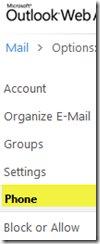
If you login to Exchange OWA; Options you should see something like this; click phone and your devices will be shown to the right.
image

image

As you can see the Samsung SII did actually connect to the Exchange Server but something happened that prevented the device from fully connecting;

What I suspect had happened was the phone did not have a pin or complex password for the Unlock screen as by default a security policy will be sent down to the phone even if the Exchange security policy is blank; the user must then accept the policy which then gets applied and the phone is accepted for ActiveSync.

In my situation this still did not work; what did work for me was removing the device from Exchange;

Select your Phone as follows;

image

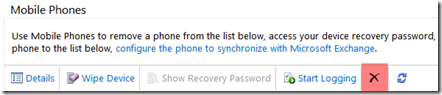
And carefully select the X (delete) icon as shown in red below; this will not wipe or do anything to your Phone; rather its removing the device from your Exchange profile.
image

Once this has been removed; power off and back on your phone and complete the email process again; hopefully all should work. You should also accept the Exchange Security Policy and after a few minutes your emails should start to Sync.

I have noticed this scenario a few times with other Android devices and I suspect its either a bug or the device is not fully supporting Microsoft’s ActiveSync (which is licensed by the phone provider).

One other last tip; the username has to be domain\username don't get confused by the label of Domain: Username.

I hope this helps.

Monday, 8 August 2011

Exchange 2003 and Mailbox Language

Scenario; your in another country and you check your email via OWA and for some reason the language within OWA and Outlook changes?

Fix, try this:

1. Open control panel, expand "Regional and language options","Regional Option", select "English" or your chosen language.

2. [HKEY_CURRENT_USER\Software\Microsoft\Internet Explorer\International] = "AcceptLanguage"="en-GB"

3. log off and log on to your machine

4. Start, Run

Outlook /resetfoldernames


Exchange 2010 and Mailbox Language

PowerShell prompt;

Set-Mailbox -Identity "Joe Blogs" -Languages "en-GB"

Language Codes

Friday, 5 August 2011

VMware vSphere 5 Licensing and Pricing Update

As Citizen Smith would say ‘Power to the People!’

VMware has decided to double (x2) the vRam entitlements under its new licensing rules.

image


Does it go far enough?

http://blogs.vmware.com/partner/2011/08/vmware-vsphere-5-licensing-and-pricing-update.html