I had a situation recently whereby I upgraded a Windows 10 (1607) guest under VMWare to 1709; on reboot the VMWare console screen went black – I could access the vm via RDP but not via the VMWare console.
My issue related to the vmware tools in that I needed the latest installer/iso; once I upgraded the tools the console started working again.
You can download the latest VMWare Tools here
Thursday, 15 March 2018

Thursday, 14 December 2017
System repair pending which requires reboot to complete (loop)
You get the following error message when running SFC /scannow even after you reboot?
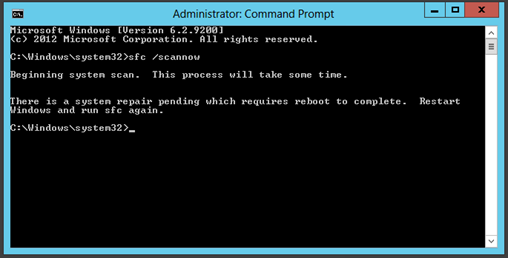
You might also find on reboot that Windows updates are reverting / failing.

You are stuck every time you run SFC as it keeps telling you to reboot? Are you windows updates also failing? Did you ever rename or delete the C:\Windows\SoftwareDistribution folder to fix an issues with windows updates?
Try
FIX
The following fix may work but I do not recommend it unless you know what your doing and your prepared for any issues that may occur afterwards. Do so at your own risk!
Locate your WinSxS folder, usually C:\Windows\WinSxS
Do you have a file called pending.xml and does the date/time match the time you started having issues?
Rename pending.xml to pending.xml.old; in order to do this you must take ownership of the pending.xml file either via Windows Explorer or using takeown.
- Administrator command prompt
- takeown /f C:\Windows\winsxs\pending.xml
- Ren c:\windows\winsxs\pending.xml pending.old
Reboot and try sfc /scannow ….
Wednesday, 13 December 2017
Microsoft FTP / FTPS and TLS 1.2
You have a Microsoft FTP / FTPS server that works with SSLv3 and TLS 1.0; clients can connect with TLS 1.2 but uploads fail with the following error codes:
550: Unexpected reply code
550: The supplied message is incomplete
550: signature was not verified
550: Messaging Exception
https://support.microsoft.com/pt-pt/hotfix/kbhotfix?kbnum=2888853&kbln=en-US
Sunday, 3 April 2016
Unable to see Office 365 Modern Groups in Outlook 2016
This issue is seen in HYBRID configurations.
If you have on Premise Exchange 2010 SP3 RU 7 and above and is connecting to Microsoft Exchange Online, the users will not be able to see modern Groups in Outlook 2016 at all.
This happens for 2 reasons:
1. Dirsync is not capable of "Group Writeback". It needs to be upgraded to Azure AD Connect.
2. This group will be represented as a distribution group in on-premises AD DS. Your on-premises Exchange server must be on Exchange 2013 cumulative update 8 (released in March 2015) or Exchange 2016 to recognize this new group type.
Refer: https://azure.microsoft.com/en-us/documentation/articles/active-directory-aadconnect-feature-preview/#group-writeback
Resolution
1. The modern group is a pure cloud based feature. If you point the MX record to the local Exchange server, the group cannot receive any emails from the external senders. It is an expected behavior. To resolve it, we can point the MX record to the Office 365 EOP
2. For Hybrid scenarios where customer has Exchange 2013 , please update the same to latest CU and upgrade to Azure AD Connect for Group writeback
3. For Customer's that have exchange 2010 on premise, ensure that they have upgraded to Azure AD Connect for Group writeback and they need to set the SMTP of the group as name@domain.onmicrosoft.com. This is not going to work on vanity domains. At present, we can use the following PowerShell to manage the primary SMTP address of the modern groups:
Set-UnifiedGroup xxxxx -PrimarySmtpAddress group@domain.onmicrosoft.com (where xxxxxx is group alias name)
to get a list of your Unified Groups:
Get-UnifiedGroup
If you have on Premise Exchange 2010 SP3 RU 7 and above and is connecting to Microsoft Exchange Online, the users will not be able to see modern Groups in Outlook 2016 at all.
This happens for 2 reasons:
1. Dirsync is not capable of "Group Writeback". It needs to be upgraded to Azure AD Connect.
2. This group will be represented as a distribution group in on-premises AD DS. Your on-premises Exchange server must be on Exchange 2013 cumulative update 8 (released in March 2015) or Exchange 2016 to recognize this new group type.
Refer: https://azure.microsoft.com/en-us/documentation/articles/active-directory-aadconnect-feature-preview/#group-writeback
Resolution
1. The modern group is a pure cloud based feature. If you point the MX record to the local Exchange server, the group cannot receive any emails from the external senders. It is an expected behavior. To resolve it, we can point the MX record to the Office 365 EOP
2. For Hybrid scenarios where customer has Exchange 2013 , please update the same to latest CU and upgrade to Azure AD Connect for Group writeback
3. For Customer's that have exchange 2010 on premise, ensure that they have upgraded to Azure AD Connect for Group writeback and they need to set the SMTP of the group as name@domain.onmicrosoft.com. This is not going to work on vanity domains. At present, we can use the following PowerShell to manage the primary SMTP address of the modern groups:
Set-UnifiedGroup xxxxx -PrimarySmtpAddress group@domain.onmicrosoft.com (where xxxxxx is group alias name)
to get a list of your Unified Groups:
Get-UnifiedGroup
Wednesday, 29 July 2015
Windows 10 - bring out the gimp!

Languages: English
SHA1: 60CCE9E9C6557335B4F7B18D02CFE2B438A8B3E2
File Name: en_windows_10_multiple_editions_x86_dvd_6848465.iso
Languages: English
SHA1: D927A91E1DD7D9C6023D0DA1DBCB16DEFEC5B6C1
File Name: en_windows_10_iot_core_for_raspberry_pi_2_arm_dvd_6856748.iso
Languages: English
SHA1: 2537BD29DA33CE59B6CE4134A817CE1265BDE6FC
File Name: en-gb_windows_10_enterprise_2015_ltsb_x86_dvd_6848457.iso
Languages: English
SHA1: 3ECDC3D9CC6FBF06B6762E175BD3A27F1223F1B8
File Name: en_windows_10_enterprise_2015_ltsb_x86_dvd_6848454.iso
Languages: English
SHA1: ABE400AD86C604197A3B163E31AFCC1B7C53325E
File Name: en-gb_windows_10_enterprise_x64_dvd_6851157.iso
Languages: English
SHA1: FBEBD41F7EAEF4C9E6CC87CD78C9159D6DEDD92C
File Name: en-gb_windows_10_enterprise_x86_dvd_6851158.iso
Languages: English
SHA1: 3D86AFB3D86B0F7E90C12E2AF5A7838C268272B4
File Name: en_windows_10_enterprise_x64_vhd_6883887.vhd
Languages: English
SHA1: 26AA760A05AB6F5D1EA9090C30FB58DF21D26BA1
File Name: en_windows_10_education_x86_dvd_6848121.iso
Languages: English
SHA1: BB26243771F911C26D0FB9BE3171D3F1C74615A3
File Name: en-gb_windows_10_education_x64_dvd_6848122.iso
Languages: English
SHA1: 34924BC6A518A704D9A2E8E4A524A340882737B9
File Name: en_windows_10_education_x64_dvd_6848120.iso
Languages: English
SHA1: 02D3174B7853AA3465828B0AE1D3D6A0C22AFD57
File Name: en_windows_10_enterprise_x86_dvd_6851156.iso
Languages: English
SHA1: E7138032986BFCFA0E5F1A8E41E2E9FD1EC94268
File Name: en_windows_10_enterprise_x64_dvd_6851151.iso
Languages: English
SHA1: 30AD1CDF5D0670F12788005131E24862F6AB8AAB
File Name: en_windows_10_features_on_demand_x64_dvd_6846440_.iso
Languages: English
SHA1: 5B1050FD0B7502207FF2C22E08E02662A62C3473
Windows 10 features on demand are additional feature options available through Windows Update. This download allows organizations to pre-configure Windows 10 installation software with these features prior to deployment. This download can also be used to install features from local media.
Wednesday, 1 October 2014


Tuesday, 29 July 2014
Windows Server 2003 and Windows Server 2012 R2 domain controllers
Have you got Windows Server 2003 domain controllers?
Have you started the migration to Windows Server 2012 R2?
Have you added a Windows Server 2012 R2 domain controller into the same domain as your Windows Server 2003 domain controllers?
Houston!, you might have a problem!;
When any domain user tries to log on to their computer, the logon may fail with “unknown username or bad password”. Only local logons are successful.
Event ID: 4
Source: Kerberos
Type: Error
"The Kerberos client received a KRB_AP_ERR_MODIFIED error from the server host/myserver.domain.com. This indicates that the password used to encrypt the Kerberos service ticket is different than that on the target server. Commonly, this is due to identically named machine accounts in the target realm (domain.com), and the client realm. Please contact your system administrator."
Please review this article as there are lots of people having issues and there is currently NO fix!
UPDATE: The hotfix is now available for this issue! Get it at http://support.microsoft.com/kb/2989971
Wednesday, 14 May 2014
Tuesday, 13 May 2014
Microsoft Azure RemoteApp
A new service from Microsoft that delivers Windows applications from the Azure cloud. Azure RemoteApp features the high fidelity, WAN-ready user experience of RDP and RemoteFX, builds on the proven Remote Desktop Services infrastructure in Windows Server, and leverages Azure’s global scale and utility-grade reliability as a leading cloud provider, providing a finished, turn-key service that offers Windows applications as a service accessible from anywhere.
Join the preview today: http://remoteapp.azure.com
Key Features
End-user Experience
Those of you familiar with RemoteApp in Windows Server will instantly recognize the user experience in Azure RemoteApp: While the application is running remotely, it appears to the user as if it is running locally on the client device. Azure RemoteApp uses RDP, a WAN ready protocol that is resilient to network latency and loss. The applications are delivered with a high fidelity, fast and fluid user experience appropriate for a variety of interactive scenarios and content, from routine text input to multimedia.
Supported Clients
With this announcement, we are releasing a brand new Microsoft RemoteApp app for Windows, and we are also issuing updates to our Microsoft Remote Desktop apps for iOS and Android to support Azure RemoteApp. We will soon add Azure RemoteApp support to our client apps for Mac, Windows Phone and Windows RT as well.
Persistent Storage for Users
Azure RemoteApp provides users with 50GB persistent storage. This storage is backed by highly reliable, fault tolerant Azure Storage and it is persistent.
Windows Server 2012R2 Session Virtualization
Azure RemoteApp builds on the Remote Desktop Services capabilities of Windows Server. Users share common underlying infrastructure through Session Virtualization, which provides for a highly efficient application hosting environment.
Office 2013 Preinstalled
Office is arguably the most important and prevalent application suite out there. During the preview, we are offering Microsoft Office 2013 ProPlus preinstalled with Azure RemoteApp.
Dynamic Scalability
Azure RemoteApp is built on Azure’s scalable fabric and extends it by providing a platform-as-a-service environment for Windows apps. This environment is dynamically scalable, expanding or shrinking capacity in real time in response to user connections. With traditional desktop virtualization deployments, capacity planning and capital expenditures are a major concern. In contrast, with Azure RemoteApp, you do not need to invest in expensive hardware and you get dynamic scalability built-in.
Global Presence
Azure RemoteApp benefits from Azure’s global network of datacenters. At preview, we are offering Azure RemoteApp in six regions: US West, US East, Western Europe, North Europe, East Asia, and Southeast Asia.
Two Deployment Choices: Cloud-only and Hybrid
More information can be found here;
Thursday, 10 April 2014
Microsoft Azure Automation
This tutorial walks you through the steps to import and execute an Automation runbook in Microsoft Azure.
Microsoft Azure Automation provides a way for developers to automate the manual, long-running, error-prone, and frequently repeated tasks that are commonly performed in a cloud environment. You can create, monitor, manage, and deploy resources in your Azure environment using runbooks, which under the hood are Windows PowerShell Workflows. To learn more about Automation, see the Automation Overview Guide.
Wednesday, 9 April 2014
Enterprise Mode Site List Manager Tool

Enterprise Mode, a compatibility mode that runs on Internet Explorer 11, lets websites render using a modified browser configuration that’s designed to avoid the common compatibility problems associated with web apps written and tested on older versions of Internet Explorer, like Internet Explorer 7 or Internet Explorer 8.
You can use Internet Explorer 11 and the Enterprise Mode Site List Manager tool to add individual website domains and domain paths and to specify whether the site renders using Enterprise Mode or Standards mode.

Microsoft Virtual Machine Converter 2.0
Microsoft® Virtual Machine Converter (MVMC) is a Microsoft-supported, stand-alone solution for the information technology (IT) pro or solution provider who wants to convert virtual machines and disks from VMware hosts to Hyper-V® hosts and Windows Azure™.
MVMC can be deployed with minimal dependencies. Because MVMC provides native support for Windows PowerShell®, it enables scripting and integration with data center automation workflows such as those authored and run within Microsoft System Center Orchestrator 2012 R2. It can also be invoked through the Windows PowerShell® command-line interface. The solution is simple to download, install, and use. In addition to the Windows PowerShell capability, MVMC provides a wizard-driven GUI to facilitate virtual machine conversion.
New Features in MVMC 2.0
MVMC 2.0 release of MVMC includes the following new features:
- Converts virtual disks that are attached to a VMware virtual machine to virtual hard disks (VHDs) that can be uploaded to Windows Azure.
- Provides native Windows PowerShell capability that enables scripting and integration into IT automation workflows.
Note The command-line interface (CLI) in MVMC 1.0 has been replaced by Windows PowerShell in MVMC 2.0. - Supports conversion and provisioning of Linux-based guest operating systems from VMware hosts to Hyper-V hosts.
- Supports conversion of offline virtual machines.
- Supports the new virtual hard disk format (VHDX) when converting and provisioning in Hyper-V in Windows Server® 2012 R2 and Windows Server 2012.
- Supports conversion of virtual machines from VMware vSphere 5.5, VMware vSphere 5.1, and VMware vSphere 4.1 hosts Hyper-V virtual machines.
- Supports Windows Server® 2012 R2, Windows Server® 2012, and Windows® 8 as guest operating systems that you can select for conversion.
Standard MVMC Features
In addition to the new features previously identified, MVMC provides the following functionality:
- Converts and deploys virtual machines from VMware hosts to Hyper-V hosts on any of the following operating systems:
- Windows Server® 2012 R2
- Windows Server® 2012
- Windows Server 2008 R2 SP1
- Converts VMware virtual machines, virtual disks, and configurations for memory, virtual processor, and other virtual computing resources from the source to Hyper-V.
- Adds virtual network interface cards (NICs) to the converted virtual machine on Hyper-V.
- Supports conversion of virtual machines from VMware vSphere 5.5, VMware vSphere 5.0, and VMware vSphere 4.1 hosts to Hyper-V.
- Has a wizard-driven GUI, which simplifies performing virtual machine conversions.
- Uninstalls VMware Tools before online conversion (online only) to provide a clean way to migrate VMware-based virtual machines to Hyper-V.
Important MVMC takes a snapshot of the virtual machine that you are converting before you uninstall VMware Tools, and then shuts down the source machine to preserve state during conversion. The virtual machine is restored to its previous state after the source disks that are attached to the virtual machine are successfully copied to the machine where the conversion process is run. At that point, the source machine in VMware can be turned on, if required.
Important MVMC does not uninstall VMware Tools in an offline conversion. Instead, it disables VMware services, drivers, and programs only for Windows Server guest operating systems. For file conversions with Linux guest operating systems, VMware Tools are not disabled or uninstalled. We highly recommend that you manually uninstall VMware Tools when you convert an offline virtual machine. - Supports Windows Server and Linux guest operating system conversion. For more details, see the section “Supported Configurations for Virtual Machine Conversion” in this guide.
- Includes Windows PowerShell capability for offline conversions of VMware-based virtual hard disks (VMDK) to a Hyper-V–based virtual hard disk file format (.vhd file).
Note The offline disk conversion does not include driver fixes.
Download here;
Tuesday, 8 April 2014
April 8th : Windows XP : End of Life : Hello, Farewell, Goodbye!

The end of an era; may the force be with you!!
Thursday, 3 April 2014
Windows Server 2012 R2 Update 1
Changes included in the update
After the update is installed, the following features are present:
Internet Explorer 11 now includes an “Enterprise Mode.” This mode is available if you disable Enhanced Security Configuration and provides better compatibility for sites designed for Internet Explorer 8, along with tools to manage which web apps use it. You can specify a list of web apps to render dynamically in Enterprise Mode, avoiding compatibility problems with web apps written for older versions of Internet Explorer. For more information, see the Internet Explorer 11 FAQ for IT Pros or TechNet documentation.
The user interface includes buttons for Search and Power on the Start page. If you install the Desktop Experience feature, other changes introduced with Windows 8.1 Update will also be visible. For details, see What's new in Windows 8.1 Update and Windows RT 8.1 Update. The specific Windows 8.1 features installed when you install Desktop Experience have not changed from those in Windows Server 2012 R2 (see Desktop Experience Overview).
Active Directory Federation Services (AD FS) has added the capability for an administrator to enable signing in with an alternate login ID that is an attribute of the user object in Active Directory Domain Services (AD DS). This enables customers to adopt Azure Active Directory without modifying on-premises User Principal Names (UPNs). It also allows users to log in to the computer using an Office 365 email address instead of a UPN. This change does not affect the Active Directory schema. For more information, see Configuring Alternate Login ID.
The update includes all other updates released since Windows Server 2012 R2 was released.
After the update is installed, the following features are present:
Internet Explorer 11 now includes an “Enterprise Mode.” This mode is available if you disable Enhanced Security Configuration and provides better compatibility for sites designed for Internet Explorer 8, along with tools to manage which web apps use it. You can specify a list of web apps to render dynamically in Enterprise Mode, avoiding compatibility problems with web apps written for older versions of Internet Explorer. For more information, see the Internet Explorer 11 FAQ for IT Pros or TechNet documentation.
The user interface includes buttons for Search and Power on the Start page. If you install the Desktop Experience feature, other changes introduced with Windows 8.1 Update will also be visible. For details, see What's new in Windows 8.1 Update and Windows RT 8.1 Update. The specific Windows 8.1 features installed when you install Desktop Experience have not changed from those in Windows Server 2012 R2 (see Desktop Experience Overview).
Active Directory Federation Services (AD FS) has added the capability for an administrator to enable signing in with an alternate login ID that is an attribute of the user object in Active Directory Domain Services (AD DS). This enables customers to adopt Azure Active Directory without modifying on-premises User Principal Names (UPNs). It also allows users to log in to the computer using an Office 365 email address instead of a UPN. This change does not affect the Active Directory schema. For more information, see Configuring Alternate Login ID.
The update includes all other updates released since Windows Server 2012 R2 was released.
Wednesday, 2 April 2014

Windows 8.1 Update 1 & Windows 2012 R2 Update 1
Windows 8.1 with Update (multiple editions) (x64) - DVD (English)
ISO English Release Date: 4/2/2014 Details
Download 3924 MB
File Name: en_windows_8.1_with_update_x64_dvd_4065090.iso
Languages: English
SHA1: 4652DC6EBFEBE02C6A63E167C36E3FAEDFB93999
Windows Server 2012 R2 VL with Update (x64) - DVD (English)
ISO English Release Date: 4/2/2014 Details
Download 4338 MB
File Name: en_windows_server_2012_r2_vl_with_update_x64_dvd_4065221.iso
Languages: English
SHA1: D4B28F350981A7C3306DD409B172AEA10D8599AC
Windows 8.1, Windows Server 2012 R2, Windows Embedded 8.1 Industry Update (x64) - (Multiple Languages)
Download 770 MB
File Name: mu_windows_8.1_windows_server_2012r2_windows_embedded_8.1industry_update_x64_4046913.zip
SHA1: 6A5CBC6FD6C1366F1041E03820FD8508FC95A4AC
Thursday, 27 March 2014
Office for iPad
Microsoft Word download
Microsoft Excel download
Microsoft PowerPoint download
Q: How much does Office for iPad cost?
A: You can download the Office apps for free and read, view and present documents, spreadsheets and presentations. To get the full editing and creation experience, you need an Office 365 subscription. Office 365 gives you always-up-to-date versions of Office across your PC, Mac and iPad, and much more.
Q: Can I try Office for iPad?
A: Yes, you can read, view and present documents, spreadsheets and presentations for free. To get the full editing and creation experience, you can sign up for a free 30 day Office 365 trial at www.office.com/try. Then download the Office for iPad apps in the App Store. During your trial period, you can use Office across your PC, Mac and iPad.
Q: What Office 365 subscription plans include Office for iPad?
A: Office 365 Home, Office 365 Small Business Premium, Office 365 Midsize Business, Office 365 E3 and E4 (Enterprise and Government), Office 365 Education A3 and A4, Office 365 ProPlus, and Office 365 University. The new Office 365 Personal will also qualify when it becomes available later this spring.
Q: What are the system requirements for Office for iPad?
A: You need an iPad running iOS 7.0 or later.
Tuesday, 25 March 2014
Anyone for DOS? Word 1.1a?
Microsoft has dusted off the source code for early versions of MS-DOS and Word for Windows and with the help of the Computer History Museum are making this source code available to the public for the first time.
The museum has done an excellent job of curating some of the most significant historical software programs in computing history. As part of this on-going project, the museum will make available two of the most widely used software programs of the 1980’s, MS DOS 1.1 and 2.0 and Microsoft Word for Windows 1.1a, to help future generations of technologists better understand the roots of personal computing.
http://www.computerhistory.org/atchm/microsoft-ms-dos-early-source-code
http://www.computerhistory.org/atchm/microsoft-word-for-windows-1-1a-source-code
Saturday, 22 March 2014
SQL Server 2014 releases April 1st
Well they could have picked a better day;
In-Memory OLTP
Windows Azure Integrated Backups
Azure Integrated AlwaysOn Availability Groups
Full matrix is here of features verses editions;
In-Memory OLTP
Windows Azure Integrated Backups
Azure Integrated AlwaysOn Availability Groups
Full matrix is here of features verses editions;
Subscribe to:
Posts (Atom)